快速调试&热重载
VSCode
在csproj文件里添加以下内容:
1
2
3
4
5
6
7
8
9
10
11
12
13
14
15
16
17
18
19
20
21
22
23
24
25
26
27
28
29
30
31
32
|
<Sts2DataDir>$(Sts2Dir)/data_sts2_windows_x86_64</Sts2DataDir>
</PropertyGroup>
<PropertyGroup Condition="'$(Configuration)' == 'Debug'">
<Optimize>false</Optimize>
<DebugType>portable</DebugType>
</PropertyGroup>
<PropertyGroup Condition="'$(Configuration)' == 'Release'">
<Optimize>true</Optimize>
<DebugType>none</DebugType>
<PathMap>$(AppOutputBase)=.\</PathMap>
</PropertyGroup>
<ItemGroup>
<Reference Include="sts2">
<HintPath>$(Sts2DataDir)/sts2.dll</HintPath>
<Private>false</Private>
</Reference>
<Target Name="Copy Mod" AfterTargets="PostBuildEvent">
<Message Text="Copying mod to Slay the Spire 2 mods folder..." Importance="high"/>
<MakeDir Directories="$(Sts2Dir)/mods/"/>
<Copy SourceFiles="$(TargetPath)" DestinationFolder="$(Sts2Dir)/mods/$(MSBuildProjectName)/"/>
<Copy SourceFiles="$(TargetDir)$(TargetName).pdb"
DestinationFolder="$(Sts2Dir)/mods/$(MSBuildProjectName)/"
Condition="Exists('$(TargetDir)$(TargetName).pdb')" />
<Copy SourceFiles="$(MSBuildProjectName).json" DestinationFolder="$(Sts2Dir)/mods/$(MSBuildProjectName)/"/>
</Target>
|
在项目根目录创建一个.vscode文件夹。
1
2
3
4
5
6
7
8
9
10
11
12
13
14
15
16
17
18
| {
"version": "0.2.0",
"configurations": [
{
"name": "Run Debug",
"type": "coreclr",
"request": "launch",
"preLaunchTask": "build",
"program": "${config:sts2.installDir}/${config:sts2.gameExeName}",
"cwd": "${config:sts2.installDir}",
"console": "internalConsole",
"sourceFileMap": {
".\\": "${workspaceFolder}/"
},
"stopAtEntry": false
}
]
}
|
1
2
3
4
5
6
7
8
9
10
11
12
13
14
15
16
17
18
19
| {
"version": "2.0.0",
"tasks": [
{
"label": "build",
"type": "process",
"command": "dotnet",
"args": [
"build",
"${workspaceFolder}/${config:sts2.modId}.csproj",
"-c",
"Debug",
"--nologo"
],
"group": "build",
"problemMatcher": "$msCompile"
}
]
}
|
- 然后放一个
settings.json文件:(路径、名字改成你自己的)
1
2
3
4
5
| {
"sts2.installDir": "D:/Steam/steamapps/common/Slay the Spire 2",
"sts2.gameExeName": "SlayTheSpire2.exe",
"sts2.modId": "test"
}
|
接着打开vscode的设置(ctrl+,),查找Csharp › Experimental › Debug: Hot Reload([实验性] 在调试时启用 C# 热重载。)并启用。
然后按F5启动就可以。
当你修改代码后,点击测试表盘中的火焰图标(🔥)应用热重载。热重载功能有限,不能有增删函数等过大改动。
资源PCK不能通过这个方式热重载。
如果你进不了游戏提示不通过steam,记得在根目录创建一个steam_appid.txt,里面写2868840。
你还可以进行断点调试。点击一行代码左侧小红点即可。
Rider
在csproj文件里添加以下内容:
1
2
3
4
5
6
7
8
9
10
11
12
13
14
15
16
17
18
19
20
21
22
23
24
25
26
27
28
29
30
31
32
|
<Sts2DataDir>$(Sts2Dir)/data_sts2_windows_x86_64</Sts2DataDir>
</PropertyGroup>
<PropertyGroup Condition="'$(Configuration)' == 'Debug'">
<Optimize>false</Optimize>
<DebugType>portable</DebugType>
</PropertyGroup>
<PropertyGroup Condition="'$(Configuration)' == 'Release'">
<Optimize>true</Optimize>
<DebugType>none</DebugType>
<PathMap>$(AppOutputBase)=.\</PathMap>
</PropertyGroup>
<ItemGroup>
<Reference Include="sts2">
<HintPath>$(Sts2DataDir)/sts2.dll</HintPath>
<Private>false</Private>
</Reference>
<Target Name="Copy Mod" AfterTargets="PostBuildEvent">
<Message Text="Copying mod to Slay the Spire 2 mods folder..." Importance="high"/>
<MakeDir Directories="$(Sts2Dir)/mods/"/>
<Copy SourceFiles="$(TargetPath)" DestinationFolder="$(Sts2Dir)/mods/$(MSBuildProjectName)/"/>
<Copy SourceFiles="$(TargetDir)$(TargetName).pdb"
DestinationFolder="$(Sts2Dir)/mods/$(MSBuildProjectName)/"
Condition="Exists('$(TargetDir)$(TargetName).pdb')" />
<Copy SourceFiles="$(MSBuildProjectName).json" DestinationFolder="$(Sts2Dir)/mods/$(MSBuildProjectName)/"/>
</Target>
|
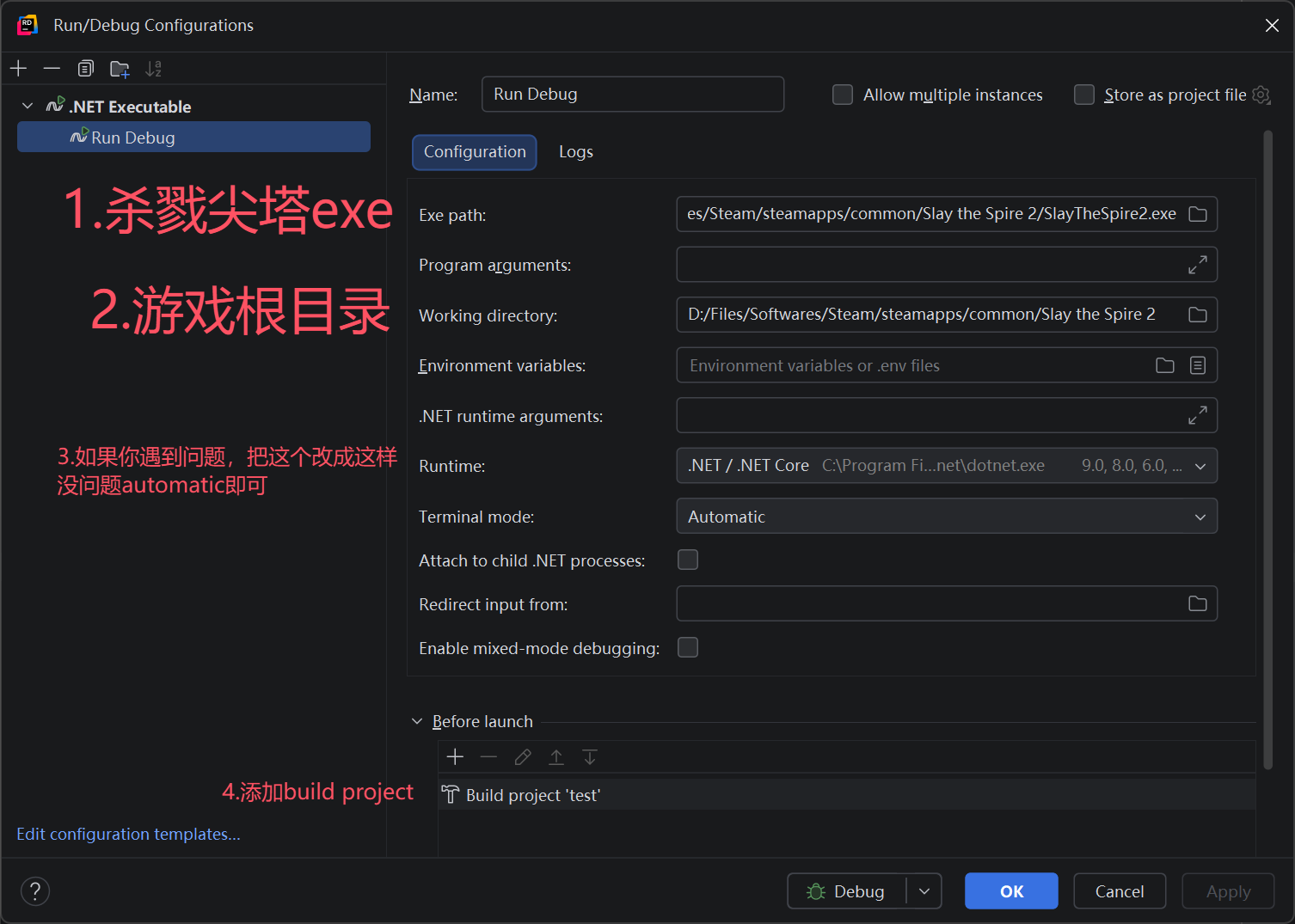
点击右上角Add Configuration,点击Edit Configuration,创建一个.NET Executable的配置文件,进行如下配置。
![alt text]()
然后按Debug模式启动就可以。(不要点击绿三角直接run)
当你修改代码后,点击测试表盘中的火焰图标(🔥),或者旧版本上方Apply Changes应用热重载。热重载功能有限,不能有增删函数等过大改动。
资源PCK不能通过这个方式热重载。
如果你进不了游戏提示不通过steam,记得在根目录创建一个steam_appid.txt,里面写2868840。
你还可以进行断点调试。点击一行代码左侧小红点即可。