Reme

04 添加新人物

添加新人物过于麻烦了,于是单开一章。

依赖BaseLib

参考上一章添加对baselib的依赖。这可以省去你很多功夫。

创建池子

需要创建人物独有的卡牌、药水、遗物池各一个。

TestCardPool.cs:

1
2
3
4
5
6
7
8
9
10
11
12
13
14
public class TestCardPool : CustomCardPoolModel
{
// 卡池的ID。必须唯一防撞车。
public override string Title => "test";

// 卡池的能量图标。暂时不支持加载,建议暂时使用原版,或者通过更改CardModel的EnergyIcon修改。
public override string EnergyColorName => "ironclad";

// 卡池的主题色。
public override Color DeckEntryCardColor => new(0.5f, 0.5f, 1f);

// 卡池是否是无色。例如事件、状态等卡池就是无色的。
public override bool IsColorless => false;
}

TestRelicPool.cs:

1
2
3
4
5
public class TestRelicPool : CustomRelicPoolModel
{
// 能量图标。
public override string EnergyColorName => "ironclad";
}

TestPotionPool.cs:

1
2
3
4
5
public class TestPotionPool : CustomPotionPoolModel
{
// 能量图标。
public override string EnergyColorName => "ironclad";
}

如果你的卡牌、药水、遗物都使用CustomxxxModel,且添加了Pool属性,那么不需要overrideGenerateAllxxx了。

创建人物

人物需要极其大量的资源,推荐新建类继承PlaceholderCharacterModel而不是CustomCharacterModel。你没有的资源直接注释掉以使用原版。教程提供的资源在最下方。

1
2
3
4
5
6
7
8
9
10
11
12
13
14
15
16
17
18
19
20
21
22
23
24
25
26
27
28
29
30
31
32
33
34
35
36
37
38
39
40
41
42
43
44
45
46
47
48
49
50
51
52
53
54
55
56
57
58
59
60
61
62
63
64
65
66
67
68
69
70
71
72
73
74
75
76
77
78
79
80
81
82
83
84
public class TestCharacter : PlaceholderCharacterModel
{
// 角色名称颜色
public override Color NameColor => new(0.5f, 0.5f, 1f);
// 能量图标轮廓颜色
public override Color EnergyLabelOutlineColor => new(0.1f, 0.1f, 1f);

// 人物性别(男女中立)
public override CharacterGender Gender => CharacterGender.Masculine;

// 初始血量
public override int StartingHp => 80;

// 人物模型tscn路径。要自定义见下。
public override string CustomVisualPath => "res://test/scenes/test_character.tscn";
// 卡牌拖尾路径。
// public override string CustomTrailPath => "res://scenes/vfx/card_trail_ironclad.tscn";
// 人物头像路径。
public override string CustomIconTexturePath => "res://icon.svg";
// 人物头像2号。
// public override string CustomIconPath => "res://scenes/ui/character_icons/ironclad_icon.tscn";
// 能量表盘tscn路径。要自定义见下。
public override string CustomEnergyCounterPath => "res://test/scenes/test_energy_counter.tscn";
// 篝火休息动画。
// public override string CustomRestSiteAnimPath => "res://scenes/rest_site/characters/ironclad_rest_site.tscn";
// 商店人物动画。
// public override string CustomMerchantAnimPath => "res://scenes/merchant/characters/ironclad_merchant.tscn";
// 多人模式-手指。
// public override string CustomArmPointingTexturePath => null;
// 多人模式剪刀石头布-石头。
// public override string CustomArmRockTexturePath => null;
// 多人模式剪刀石头布-布。
// public override string CustomArmPaperTexturePath => null;
// 多人模式剪刀石头布-剪刀。
// public override string CustomArmScissorsTexturePath => null;

// 人物选择背景。
public override string CustomCharacterSelectBg => "res://test/scenes/test_bg.tscn";
// 人物选择图标。
public override string CustomCharacterSelectIconPath => "res://test/images/char_select_test.png";
// 人物选择图标-锁定状态。
public override string CustomCharacterSelectLockedIconPath => "res://test/images/char_select_test_locked.png";
// 人物选择过渡动画。
// public override string CustomCharacterSelectTransitionPath => "res://materials/transitions/ironclad_transition_mat.tres";
// 地图上的角色标记图标、表情轮盘上的角色头像
// public override string CustomMapMarkerPath => null;
// 攻击音效
// public override string CustomAttackSfx => null;
// 施法音效
// public override string CustomCastSfx => null;
// 死亡音效
// public override string CustomDeathSfx => null;
// 角色选择音效
// public override string CharacterSelectSfx => null;
// 过渡音效。这个不能删。
public override string CharacterTransitionSfx => "event:/sfx/ui/wipe_ironclad";

public override CardPoolModel CardPool => ModelDb.CardPool<TestCardPool>();
public override RelicPoolModel RelicPool => ModelDb.RelicPool<TestRelicPool>();
public override PotionPoolModel PotionPool => ModelDb.PotionPool<TestPotionPool>();

// 初始卡组
public override IEnumerable<CardModel> StartingDeck => [
ModelDb.Card<TestCard>(),
];

// 初始遗物
public override IReadOnlyList<RelicModel> StartingRelics => [
ModelDb.Relic<TestRelic>(),
];

// 攻击建筑师的攻击特效列表
public override List<string> GetArchitectAttackVfx() => [
"vfx/vfx_attack_blunt",
"vfx/vfx_heavy_blunt",
"vfx/vfx_attack_slash",
"vfx/vfx_bloody_impact",
"vfx/vfx_rock_shatter"
];
}

自定义人物背景

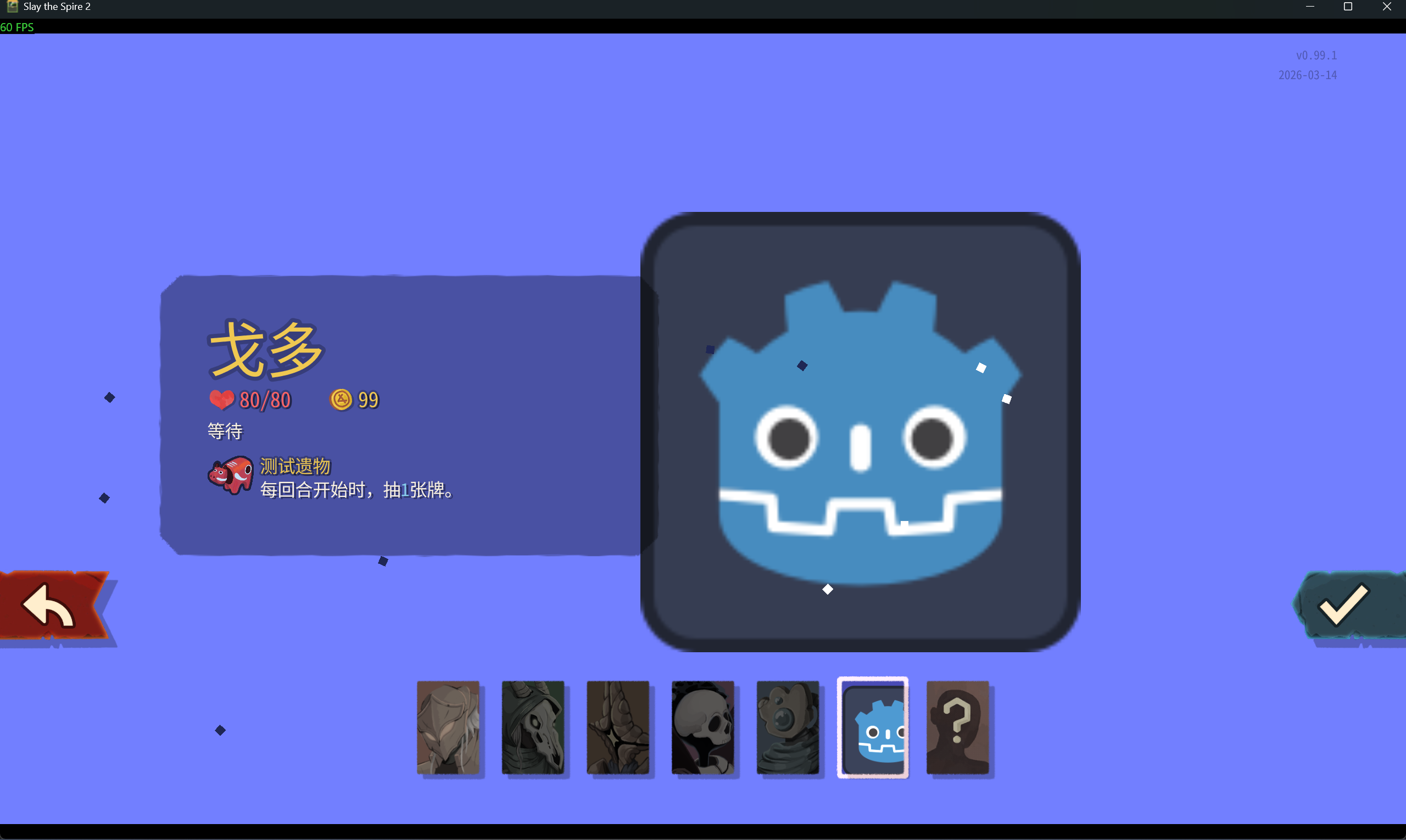
public override string CustomCharacterSelectBg => "res://test/scenes/test_bg.tscn";

没什么要求,Godot里创建一个新的场景,类型为Control,自己搭建场景即可。参考:
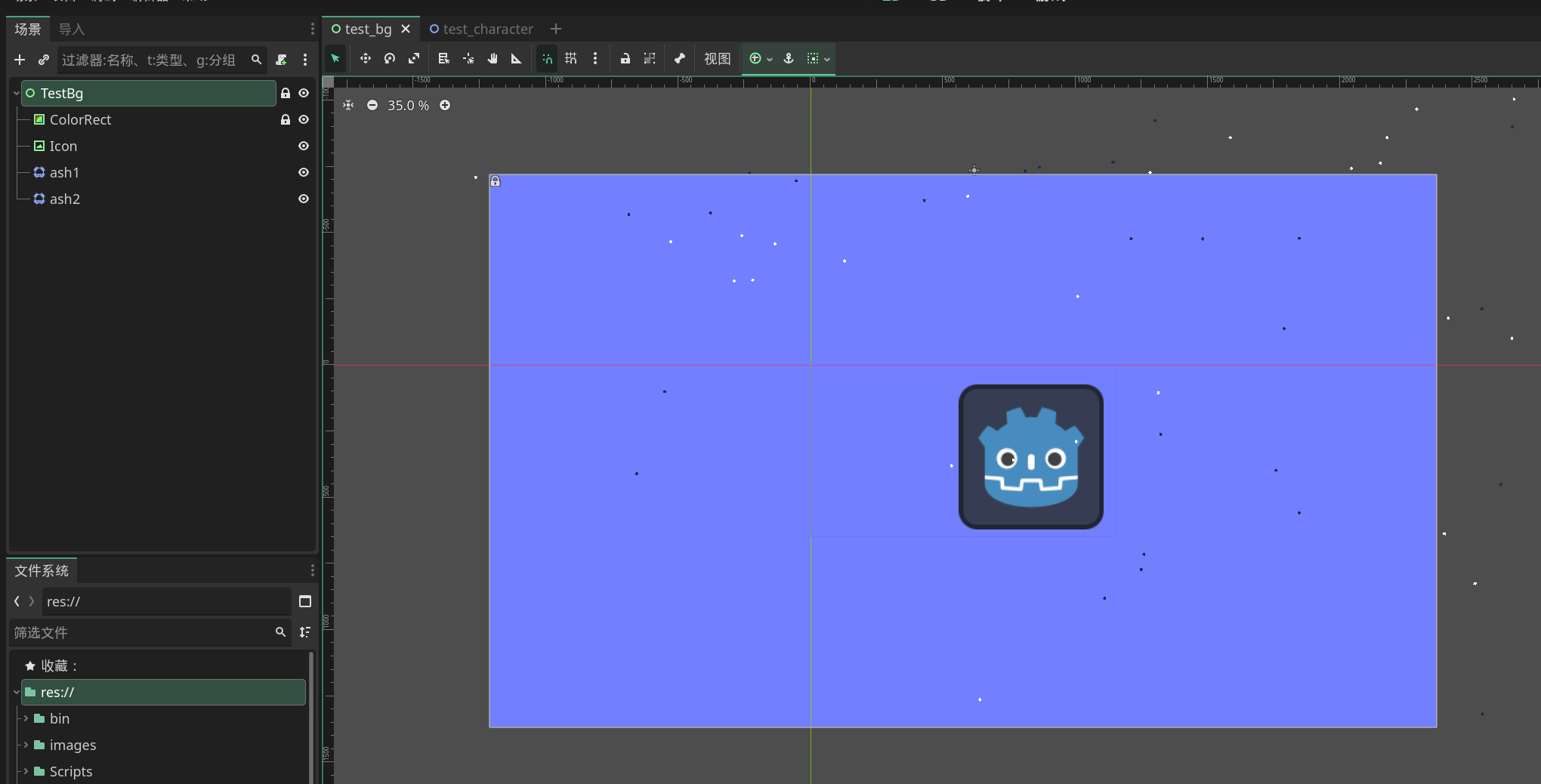
人物背景

自定义人物

public override string CustomVisualPath => "res://test/scenes/test_character.tscn";

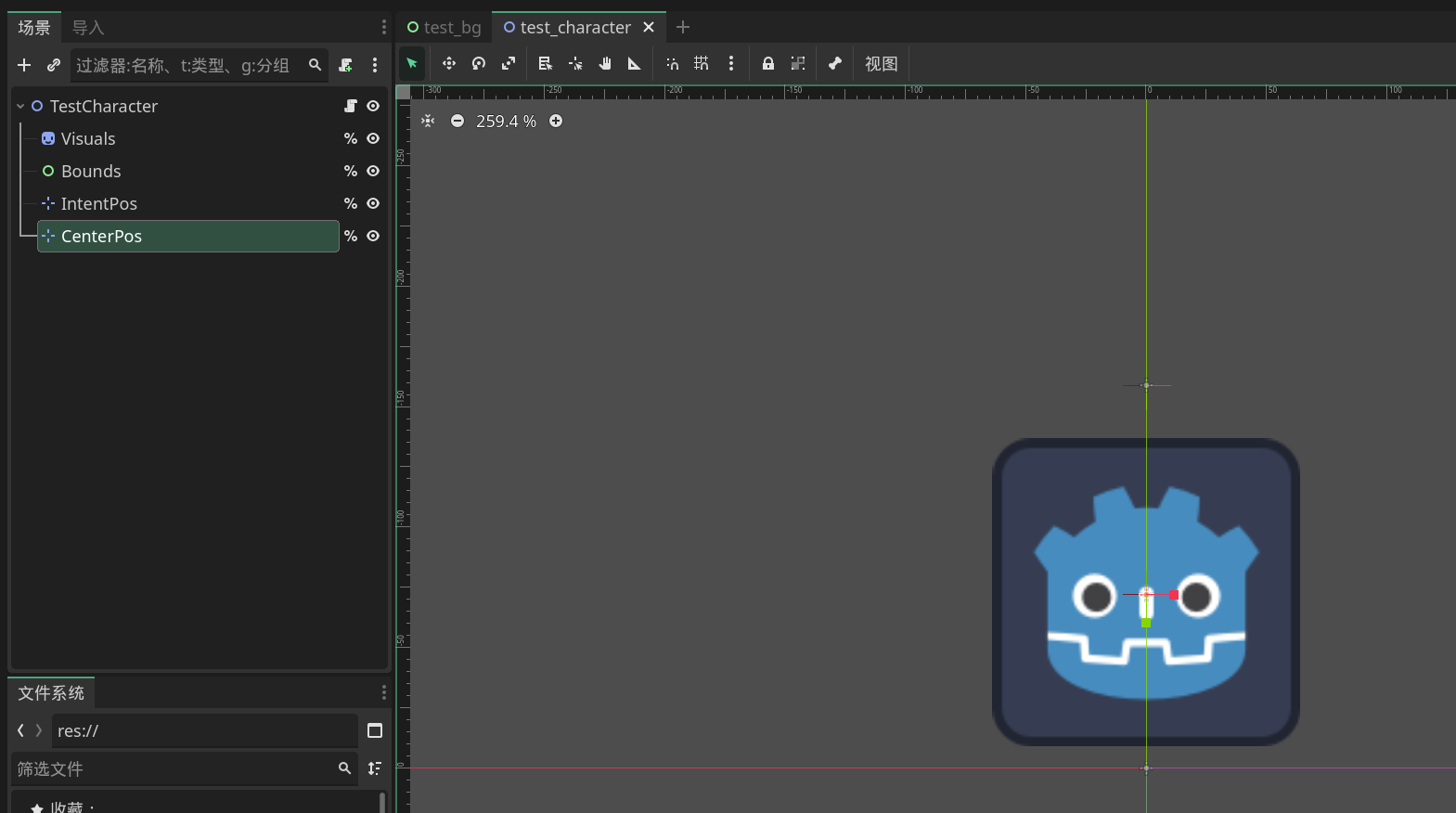
新建一个Node2D类型的场景,如下:

1
2
3
4
5
TestCharacter (Node2D)
├── Visuals (Node2D) %
├── Bounds (Control) %
├── IntentPos (Marker2D) %
└── CenterPos (Marker2D) %

其中VisualsBoundsIntentPosCenterPos需要右键勾选作为唯一名称访问,出现%即可。名字不要改。

创建一个NTestCharacter.cs,继承CreatureVisuals。然后把它挂载到TestCharacter节点上。现在不需要了。

Bounds就是你的人物hitbox的大小,如果你觉得血条太短调整一下它的大小。

  • 人物显示在x轴上方。
  • 如果想使用3d模型,新建visuals→subviewportcontainer→subviewport的层级结构,然后在subviewport中添加camera3d和任意3d模型,在3d视图中调整视角至2d视图正常显示。最后设置subviewporttransparenttrue

alt text

人物动画

  • 其中Visuals可以更改成任意继承了Node2D的类型,例如SpineSpriteSprite2D或是AnimatedSprite2D,或者在它之下新建节点都可。

  • 如果要自然支持Spine播放,需要把Visuals改成SpineSprite,且你的战斗人物模型需要有idle_loop(待机循环),attack(攻击动作),cast(能力卡动作),hurt(受伤),die(死亡)这些动画名。

  • 如果你只有一张图,那么把Visuals改成Sprite2D类型更改图片即可。

  • 此外baselib支持使用AnimationPlayer控制动画,例如你使用AnimatedSprite2D或者是3D模型。虽然AnimationPlayer放在任意位置都可以,但推荐把根节点之下。动画名和上方设置的一致即可自动播放动画。

  • 例如:如果是使用AnimatedSprite2D,设置好临近FPS(例如0.2秒),然后前往Visuals节点点击属性Frame右侧的钥匙插入关键帧,重复修改当前帧和插入关键帧即可。参考:https://docs.godotengine.org/en/stable/tutorials/2d/2d_sprite_animation.html#sprite-sheet-with-animationplayer

自定义能量表盘

public override string CustomEnergyCounterPath => "res://test/scenes/test_energy_counter.tscn";

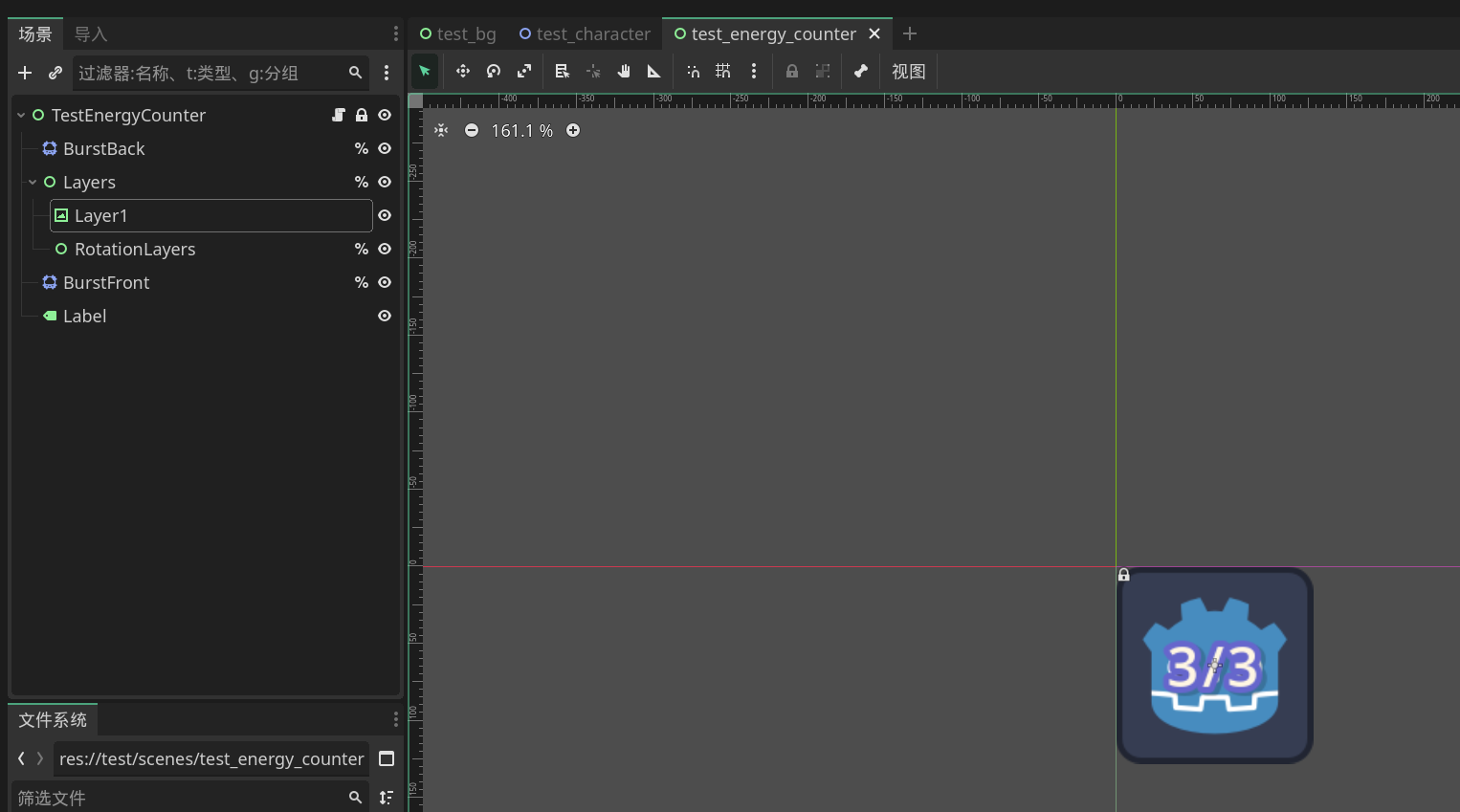
创建一个Control类型的新场景,设定以下结构:

1
2
3
4
5
6
7
TestEnergyCounter (Control)
├── BurstBack (CPUParticles2D) %
├── Layers (Control) %
│ ├── Layer1 (TextureRect,或任意)
│ └── RotationLayers (Control) %
├── BurstFront (CPUParticles2D) %
└── Label (Label)
  • 后面标%的需要作为唯一名称访问。名字不要改,label也是。
  • RotationLayers里放需要旋转的图层。没有也行。
  • 粒子动画节点参考原版设置,或者建议你直接复制最下方提供的tscn。

alt text

然后创建一个继承NEnergyCounter的类,挂载到父节点上。

1
2
3
public partial class NTestEnergyCounter : NEnergyCounter
{
}

保存一下然后关闭这个场景,然后开始神秘操作。在本地,或者是你的ide里打开这个tscn文件,先修改开头,

  • ext_resource这一组(推荐ext最下面,sub最上面)添加mega_label这一行。
  • 添加kreon_bold_shared_font这一行。
  • sub_resource这一组添加FontVariation_kreon_bold_shared_fontbase_fontspacing_glyph这三行。
  • 修改load_steps,改为原来的数字+3。(ext数量+sub数量+1)
1
2
3
4
5
6
7
8
9
10
11
12
13
14
15
16
17
18
19
20
[gd_scene load_steps=8 format=3 uid="uid://cs3a5onikvhi4"]

[ext_resource type="Texture2D" uid="uid://ddxmxgyyfy8mn" path="res://icon.svg" id="1_85qf2"]
[ext_resource type="Script" uid="uid://b4eaf7kin174o" path="res://Scripts/NTestEnergyCounter.cs" id="energy_counter"]

[ext_resource type="Script" path="res://addons/mega_text/MegaLabel.cs" id="mega_label"]

[ext_resource type="FontVariation" path="res://themes/kreon_bold_shared.tres" id="kreon_bold_shared_font"]

[sub_resource type="Curve" id="Curve_85qf2"]
_data = [Vector2(0.006, 0.031), 0.0, 4.464, 0, 0, Vector2(0.298, 0.736), 0.832, 0.832, 0, 0, Vector2(0.99, 0.933), -0.247, 0.0, 0, 0]
point_count = 3

[sub_resource type="Gradient" id="Gradient_1ytbd"]
offsets = PackedFloat32Array(0, 0.35164836, 0.64835167, 1)
colors = PackedColorArray(1, 1, 1, 0, 1, 1, 1, 1, 1, 1, 1, 1, 1, 1, 1, 0)

[sub_resource type="FontVariation" id="FontVariation_kreon_bold_shared_font"]
base_font = ExtResource("kreon_bold_shared_font")
spacing_glyph = 2
  • 然后往下,找到[node name="Label" type="Label" parent="."]这一行,添加以下两行。
1
2
theme_override_fonts/font = SubResource("FontVariation_kreon_bold_shared_font")
script = ExtResource("mega_label")
  • 然后不要再打开这个文件。如果你想修改,保存以后重复以上内容。
  • TODO:或者你也可以通过新建一个继承MegaLabel的类挂载,把反编译的字体资源复制到本地以省去以上工作。

本地化文件

创建{modId}/localization/{Language}/characters.json,填写以下内容:

1
2
3
4
5
6
7
8
9
10
11
12
13
14
15
16
17
18
19
20
21
22
23
24
25
26
27
28
29
30
31
32
{
// 混沌香气事件中的内心独白
"TEST-TEST_CHARACTER.aromaPrinciple": "[sine][blue]……等待……[/blue][/sine]",
// 多人模式:存活时回合结束对白
"TEST-TEST_CHARACTER.banter.alive.endTurnPing": "……",
// 多人模式:死亡后回合结束对白
"TEST-TEST_CHARACTER.banter.dead.endTurnPing": "……",
// 自定义模式文本
"TEST-TEST_CHARACTER.cardsModifierDescription": "戈多的卡牌现在会出现在奖励和商店中。",
// 卡池名字
"TEST-TEST_CHARACTER.cardsModifierTitle": "戈多卡牌",
// 角色选择界面描述
"TEST-TEST_CHARACTER.description": "一个在无尽等待中的存在。\n时间对[gold]戈多[/gold]而言,不过是另一种形式的永恒。",
// 死亡时事件对话
"TEST-TEST_CHARACTER.eventDeathPrevention": "我还得继续等下去……",
// 沉没宝库事件中对金币的独白
"TEST-TEST_CHARACTER.goldMonologue": "[sine]这些金币……也许能派上用场……[/sine]",
// 物主形容词,用于动态文本
"TEST-TEST_CHARACTER.possessiveAdjective": "他的",
// 宾语代词
"TEST-TEST_CHARACTER.pronounObject": "他",
// 所有格代词
"TEST-TEST_CHARACTER.pronounPossessive": "他的",
// 主语代词
"TEST-TEST_CHARACTER.pronounSubject": "他",
// 角色名(标题用)
"TEST-TEST_CHARACTER.title": "戈多",
// 角色名(作宾语用)
"TEST-TEST_CHARACTER.titleObject": "戈多",
// 解锁条件文案,{Prerequisite} 会被替换
"TEST-TEST_CHARACTER.unlockText": "用[pink]{Prerequisite}[/pink]进行一局游戏来解锁这个角色。"
}

不要忘记在你的Init初始化函数中添加ScriptManagerBridge.LookupScriptsInAssembly(typeof(Entry).Assembly);这一行。

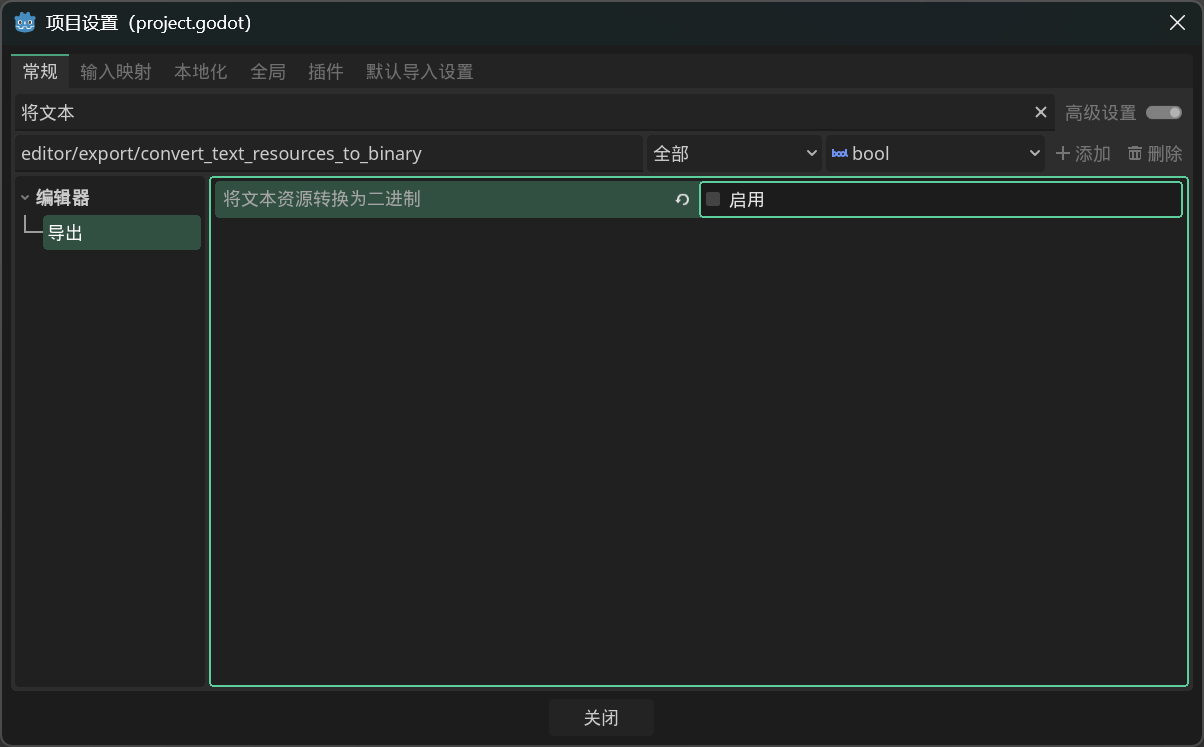
  • 打开项目→项目设置,把将文本资源转换为二进制禁用。

3

alt text

附赠资源

alt text

alt text

test_bg.tscn:

1
2
3
4
5
6
7
8
9
10
11
12
13
14
15
16
17
18
19
20
21
22
23
24
25
26
27
28
29
30
31
32
33
34
35
36
37
38
39
40
41
42
43
44
45
46
47
48
49
50
51
52
53
54
55
56
57
58
59
60
61
62
63
64
65
66
67
68
69
70
71
72
[gd_scene load_steps=2 format=3 uid="uid://cejqjeipgqe0n"]

[ext_resource type="Texture2D" uid="uid://ddxmxgyyfy8mn" path="res://icon.svg" id="1_c8lhi"]

[node name="TestBg" type="Control"]
layout_mode = 3
anchors_preset = 8
anchor_left = 0.5
anchor_top = 0.5
anchor_right = 0.5
anchor_bottom = 0.5
offset_left = -1790.0
offset_top = -1043.0
offset_right = 1790.0
offset_bottom = 1043.0
grow_horizontal = 2
grow_vertical = 2
metadata/_edit_lock_ = true

[node name="ColorRect" type="ColorRect" parent="."]
layout_mode = 1
anchors_preset = 15
anchor_right = 1.0
anchor_bottom = 1.0
grow_horizontal = 2
grow_vertical = 2
color = Color(0.44705883, 0.49803922, 1, 1)
metadata/_edit_lock_ = true

[node name="Icon" type="TextureRect" parent="."]
layout_mode = 1
anchors_preset = -1
anchor_right = 1.0
anchor_bottom = 1.0
offset_left = 1774.0
offset_top = 792.0
offset_right = -1259.0
offset_bottom = -747.0
grow_horizontal = 2
grow_vertical = 2
texture = ExtResource("1_c8lhi")

[node name="ash1" type="CPUParticles2D" parent="."]
position = Vector2(1832, -17)
amount = 40
lifetime = 15.0
preprocess = 15.0
local_coords = true
emission_shape = 3
emission_rect_extents = Vector2(2000, 1)
gravity = Vector2(27, 27)
orbit_velocity_max = 0.03
angle_min = 45.0
angle_max = 90.0
scale_amount_min = 10.0
scale_amount_max = 10.0

[node name="ash2" type="CPUParticles2D" parent="."]
position = Vector2(1832, -17)
amount = 40
lifetime = 15.0
preprocess = 15.0
local_coords = true
emission_shape = 3
emission_rect_extents = Vector2(2000, 1)
gravity = Vector2(27, 27)
orbit_velocity_max = 0.03
angle_min = 45.0
angle_max = 90.0
scale_amount_min = 10.0
scale_amount_max = 10.0
color = Color(0.121879734, 0.15283081, 0.33476263, 1)

test_character.tscn:

1
2
3
4
5
6
7
8
9
10
11
12
13
14
15
16
17
18
19
20
21
22
23
24
25
26
27
28
[gd_scene load_steps=3 format=3 uid="uid://c4dnpxxd6ldei"]

[ext_resource type="Script" uid="uid://6m0cydgurd52" path="res://Scripts/NTestCharacter.cs" id="creature_visuals"]
[ext_resource type="Texture2D" uid="uid://ddxmxgyyfy8mn" path="res://icon.svg" id="1_hxav6"]

[node name="TestCharacter" type="Node2D"]
script = ExtResource("creature_visuals")

[node name="Visuals" type="Sprite2D" parent="."]
unique_name_in_owner = true
position = Vector2(0, -73)
texture = ExtResource("1_hxav6")

[node name="Bounds" type="Control" parent="."]
unique_name_in_owner = true
layout_mode = 3
anchors_preset = 0
offset_left = -70.0
offset_top = -140.0
offset_right = 70.0

[node name="IntentPos" type="Marker2D" parent="."]
unique_name_in_owner = true
position = Vector2(0, -159)

[node name="CenterPos" type="Marker2D" parent="."]
unique_name_in_owner = true
position = Vector2(0, -72)

test_energy_counter.tscn:

1
2
3
4
5
6
7
8
9
10
11
12
13
14
15
16
17
18
19
20
21
22
23
24
25
26
27
28
29
30
31
32
33
34
35
36
37
38
39
40
41
42
43
44
45
46
47
48
49
50
51
52
53
54
55
56
57
58
59
60
61
62
63
64
65
66
67
68
69
70
71
72
73
74
75
76
77
78
79
80
81
82
83
84
85
86
87
88
89
90
91
92
93
94
95
96
97
98
99
100
101
102
103
104
105
106
107
108
109
110
111
112
113
114
115
116
117
[gd_scene load_steps=8 format=3 uid="uid://cs3a5onikvhi4"]

[ext_resource type="Texture2D" uid="uid://ddxmxgyyfy8mn" path="res://icon.svg" id="1_85qf2"]
[ext_resource type="Script" uid="uid://b4eaf7kin174o" path="res://Scripts/NTestEnergyCounter.cs" id="energy_counter"]

[ext_resource type="Script" path="res://addons/mega_text/MegaLabel.cs" id="mega_label"]

[ext_resource type="FontVariation" uid="uid://bg85h22rkxs6g" path="res://themes/kreon_bold_shared.tres" id="3_jei5p"]

[sub_resource type="Curve" id="Curve_85qf2"]
_data = [Vector2(0.006, 0.031), 0.0, 4.464, 0, 0, Vector2(0.298, 0.736), 0.832, 0.832, 0, 0, Vector2(0.99, 0.933), -0.247, 0.0, 0, 0]
point_count = 3

[sub_resource type="Gradient" id="Gradient_1ytbd"]
offsets = PackedFloat32Array(0, 0.35164836, 0.64835167, 1)
colors = PackedColorArray(1, 1, 1, 0, 1, 1, 1, 1, 1, 1, 1, 1, 1, 1, 1, 0)

[sub_resource type="FontVariation" id="FontVariation_x0k5t"]
base_font = ExtResource("3_jei5p")
spacing_glyph = 2

[node name="TestEnergyCounter" type="Control"]
layout_mode = 3
anchors_preset = 0
offset_right = 128.0
offset_bottom = 128.0
script = ExtResource("energy_counter")
metadata/_edit_lock_ = true

[node name="BurstBack" type="CPUParticles2D" parent="."]
unique_name_in_owner = true
position = Vector2(64, 64)
emitting = false
amount = 1
texture = ExtResource("1_85qf2")
one_shot = true
local_coords = true
gravity = Vector2(0, 0)
radial_accel_max = 10.0
angle_max = 260.0
scale_amount_min = 1.5
scale_amount_max = 1.5
scale_amount_curve = SubResource("Curve_85qf2")
color = Color(1, 0.49411765, 0.48235294, 0.6)
color_ramp = SubResource("Gradient_1ytbd")

[node name="Layers" type="Control" parent="."]
unique_name_in_owner = true
layout_mode = 1
anchors_preset = 15
anchor_right = 1.0
anchor_bottom = 1.0
grow_horizontal = 2
grow_vertical = 2

[node name="Layer1" type="TextureRect" parent="Layers"]
layout_mode = 1
anchors_preset = 15
anchor_right = 1.0
anchor_bottom = 1.0
grow_horizontal = 2
grow_vertical = 2
texture = ExtResource("1_85qf2")
expand_mode = 1

[node name="RotationLayers" type="Control" parent="Layers"]
unique_name_in_owner = true
anchors_preset = 0
offset_right = 40.0
offset_bottom = 40.0

[node name="BurstFront" type="CPUParticles2D" parent="."]
unique_name_in_owner = true
position = Vector2(64, 64)
emitting = false
amount = 1
texture = ExtResource("1_85qf2")
lifetime = 0.5
one_shot = true
local_coords = true
gravity = Vector2(0, 0)
angular_velocity_min = 30.0
angular_velocity_max = 30.0
radial_accel_max = 10.0
angle_max = 260.0
scale_amount_min = 1.5
scale_amount_max = 1.5
scale_amount_curve = SubResource("Curve_85qf2")
color = Color(1, 0.49411765, 0.48235294, 0.6)
color_ramp = SubResource("Gradient_1ytbd")

[node name="Label" type="Label" parent="."]
layout_mode = 1
anchors_preset = 15
anchor_right = 1.0
anchor_bottom = 1.0
offset_left = 16.0
offset_top = -29.0
offset_right = -16.0
offset_bottom = 29.0
grow_horizontal = 2
grow_vertical = 2
theme_override_colors/font_color = Color(1, 0.9647059, 0.8862745, 1)
theme_override_colors/font_shadow_color = Color(0, 0, 0, 0.1882353)
theme_override_colors/font_outline_color = Color(0.4, 0.4, 0.8, 1)
theme_override_constants/shadow_offset_x = 3
theme_override_constants/shadow_offset_y = 2
theme_override_constants/outline_size = 16
theme_override_constants/shadow_outline_size = 16
theme_override_fonts/font = SubResource("FontVariation_x0k5t")
theme_override_font_sizes/font_size = 36
script = ExtResource("mega_label")
horizontal_alignment = 1
vertical_alignment = 1
text = "3/3"
MinFontSize = 32
MaxFontSize = 36
Author: Reme
Link:https://glitchedreme.github.io/SlayTheSpire2ModdingTutorials/docs/04-add-new-character/
版权声明:本文采用 CC BY-NC-SA 3.0 CN 协议进行许可