03 BaseLib
BaseLib是统一添加新内容行为的基础mod,类似于塔1的basemod和stslib。
https://github.com/Alchyr/BaseLib-StS2
由于目前(2026.3.20)BaseLib尚处于开发阶段,如果只打patch不添加新内容可以不使用。
下载 1 2 3 4 5 6 7 8 9 10 11 12 13 14 15 16 17 18 19 <ItemGroup > <Reference Include ="sts2" > <HintPath > $(Sts2DataDir)/sts2.dll</HintPath > <Private > false</Private > </Reference > <Reference Include ="0Harmony" > <HintPath > $(Sts2DataDir)/0Harmony.dll</HintPath > <Private > false</Private > </Reference > <Reference Include ="BaseLib" > <HintPath > $(Sts2Dir)/mods/BaseLib/BaseLib.dll</HintPath > <Private > false</Private > </Reference > </ItemGroup >
不要忘了在你{modid}.json中填写dependencies。
1 "dependencies" : [ "BaseLib" ] ,
添加新卡牌 代码 创建一个新的Cards文件夹方便管理,并创建新的cs文件,例如TestCard.cs。
1 2 3 4 5 6 7 8 9 10 11 12 13 14 15 16 17 18 19 20 21 22 23 24 25 26 27 28 29 30 31 32 33 34 35 36 37 38 39 40 41 42 43 44 45 46 47 48 using BaseLib.Abstracts;using BaseLib.Utils;using MegaCrit.Sts2.Core.Commands;using MegaCrit.Sts2.Core.Entities.Cards;using MegaCrit.Sts2.Core.GameActions.Multiplayer;using MegaCrit.Sts2.Core.Localization.DynamicVars;using MegaCrit.Sts2.Core.Models.CardPools;using MegaCrit.Sts2.Core.ValueProps;namespace Test.Scripts ;Pool(typeof(ColorlessCardPool)) ]public class TestCard : CustomCardModel private const int energyCost = 1 ;private const CardType type = CardType.Attack;private const CardRarity rarity = CardRarity.Common;private const TargetType targetType = TargetType.AnyEnemy;private const bool shouldShowInCardLibrary = true ;protected override IEnumerable<DynamicVar> CanonicalVars => [new DamageVar(12 , ValueProp.Move)];public TestCard () : base (energyCost, type, rarity, targetType, shouldShowInCardLibrary )protected override async Task OnPlay (PlayerChoiceContext choiceContext, CardPlay cardPlay )await DamageCmd.Attack(DynamicVars.Damage.BaseValue) this ) protected override void OnUpgrade ()4 );
CanonicalVars翻译是“规范值”,指卡牌的基础数值。添加一个DamageVar意为指定卡牌的基础伤害是多少,例如这里是12。
ValueProp表示数值的属性,例如ValueProp.Move表示是通过卡牌造成的伤害/格挡,ValueProp.Unpowered表示不受修正影响(如力量等),ValueProp.Unblockable表示伤害不可被格挡,ValueProp.SkipHurtAnim表示跳过受伤动画。这是一个bitflag类型的枚举,你可以进行组合,例如ValueProp.Unblockable | ValueProp.Unpowered,不可被格挡也不受修正影响。
尖塔2使用了async和await来控制效果逻辑顺序执行,比如选择一张牌时就一直await不让后续代码执行,和尖塔1的action类似的生态位。此处的OnPlay中写了一个造成单体伤害的指令。
想做什么样的卡牌,看原版代码哪张有类似的效果,参考即可。
添加一个Pool的attribute,并指定要添加的颜色卡池,然后会自动注册。
继承CustomCardModel而不是CardModel。
注意 :通过baselib添加卡牌,其id会变成{命名空间第一段大写}-{原卡牌id},例如namespace Test.Scripts;取TEST,原始卡牌id为TEST-CARD,是TestCard的大写snake-case,最后变成TEST-TEST_CARD。
卡图 可以通过在卡牌类中添加一个表达式属性来添加卡牌,这样的话可以任意指定位置:public override string PortraitPath => $"res://test/images/cards/{Id.Entry.ToLowerInvariant()}.png";,test/images/cards/test-test_card.png(是你类名的snake_case命名风格加前缀,例如TestCard即为test-test_card)。当然按你的喜好组织资源路径也可。
卡图任意尺寸都可,且不需要裁剪,官方使用的尺寸是普通卡1000x760,先古卡606x852。
1
2
3
4
5
6
7
8
9
10
11
12
13
14
15
16
17
public class TestCard : TestCardModel private const int energyCost = 1 ;private const CardType type = CardType.Attack;private const CardRarity rarity = CardRarity.Common;private const TargetType targetType = TargetType.AnyEnemy;private const bool shouldShowInCardLibrary = true ;protected override IEnumerable<DynamicVar> CanonicalVars => [new DamageVar(12 , ValueProp.Move)];public override string PortraitPath => $"res://test/images/cards/{Id.Entry.ToLowerInvariant()} .png" ;public TestCard () : base (energyCost, type, rarity, targetType, shouldShowInCardLibrary )
你也可以通过新增一个abstract类,避免每张卡都写一遍卡图路径,并且方便管理一些自定义功能。
1
2
3
4
5
6
7
8
9
10
public abstract class TestCardModel : CardModel public override string PortraitPath => $"res://test/images/cards/{Id.Entry.ToLowerInvariant()} .png" ;public TestCardModel (int energyCost, CardType type, CardRarity rarity, TargetType targetType, bool shouldShowInCardLibrarybase (energyCost, type, rarity, targetType, shouldShowInCardLibrary )public class TestCard : TestCardModel {}
文本 此外还需要本地化文件。创建一个{modId}/localization/{Language}/cards.json。
modId即为你{modId}.json中填写的。不是你的根目录,而是一个新文件夹。 Language可以写zhs表示简体中文。填写{CardId}.title(卡牌名)和{CardId}.description(卡牌描述):
1
2
3
4
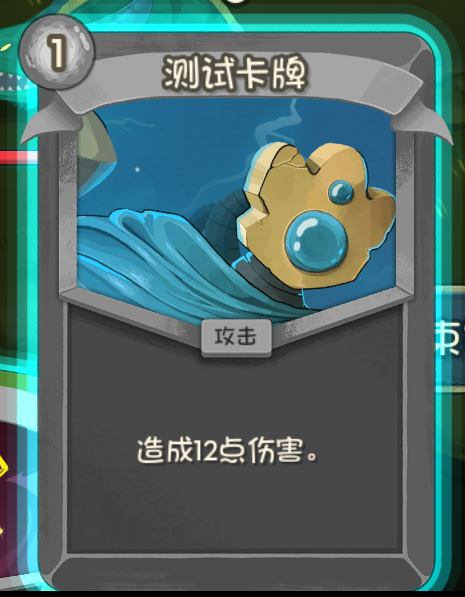
{ "TEST-TEST_CARD.title" : "测试卡牌" , "TEST-TEST_CARD.description" : "造成{Damage:diff()}点伤害。" }
编译打包dll和pck后打开游戏。如果你在对应池子中看到卡牌说明成功了。如果没有任何卡牌(或者一张在左上角的卡牌)说明出问题了。
按~打开控制台输入card TEST-TEST_CARD获得这张卡。
如果报错,回头看看。最终项目结构参考:
1
2
3
4
5
6
7
8
9
10
Test (你的项目文件夹)
自定义模组配置
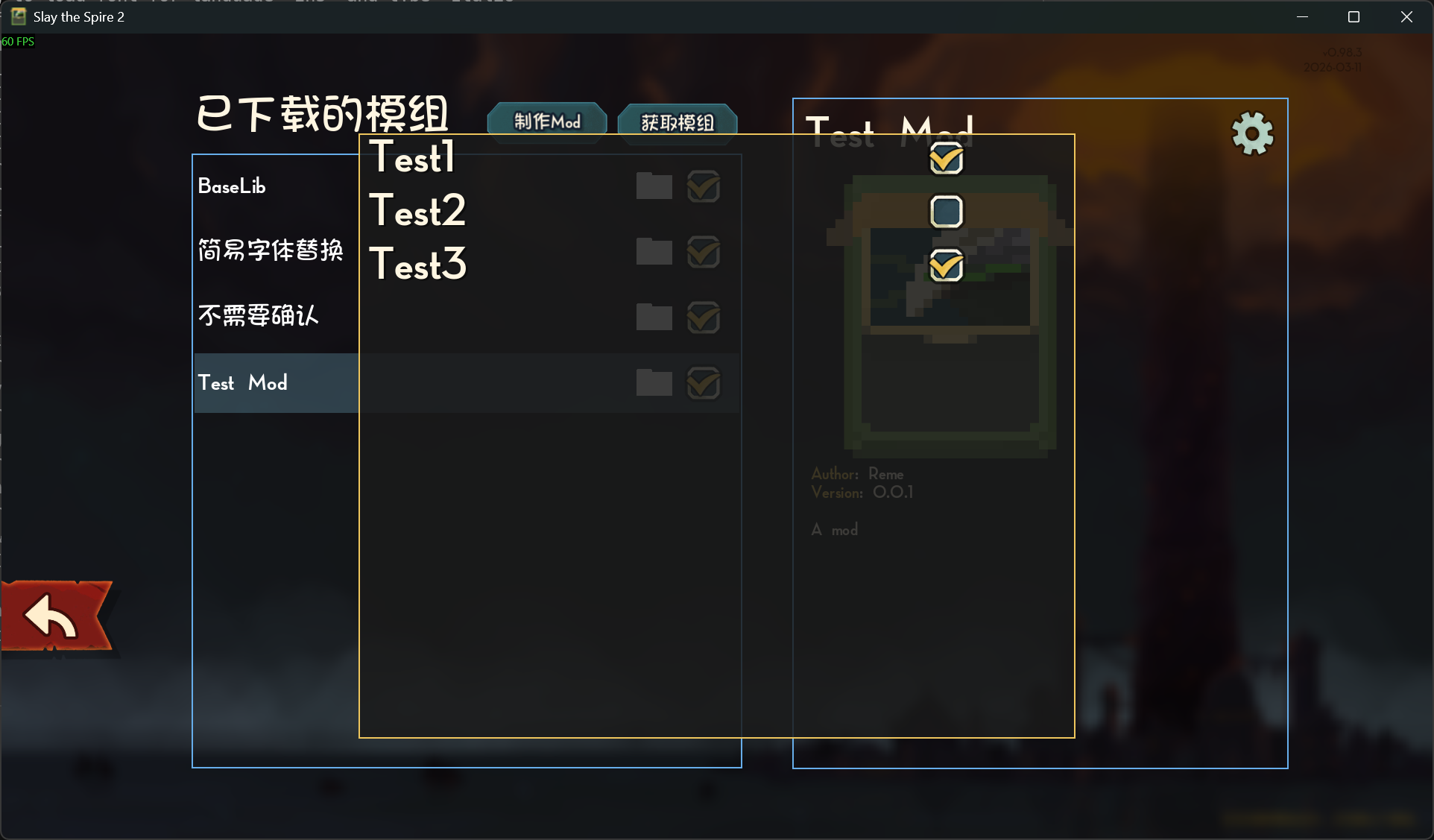
要使用此功能,需要先放一张图片到{modId}\mod_image.png作为mod图标,尺寸任意,否则会由于报错不显示配置。
添加一个继承SimpleModConfig(或者是ModConfig如果你想要更复杂的设置)的类,在其中添加public static bool变量。支持bool,double,enum。
在初始化函数调用ModConfigRegistry.Register。字符串写你的modId。
1 2 3 4 5 6 7 8 9 10 11 12 13 14 15 [ModInitializer("Init" ) ]public class Entry public static void Init ()"test" , new ModConfig());public class ModConfig : SimpleModConfig public static bool Test1 { get ; set ; } = true ;public static bool Test2 { get ; set ; } = false ;public static bool Test3 { get ; set ; } = true ;
更多请参考baselib的BaseLibConfig类。
添加新遗物 和添加卡牌类似。先新建一个类。
1 2 3 4 5 6 7 8 9 10 11 12 13 14 15 16 17 18 19 20 21 22 23 Pool(typeof(SharedRelicPool)) ]public class TestRelic : CustomRelicModel public override RelicRarity Rarity => RelicRarity.Common;protected override IEnumerable<DynamicVar> CanonicalVars => [new CardsVar(1 )];public override string PackedIconPath => $"res://test/images/relics/{Id.Entry.ToLowerInvariant()} .png" ;protected override string PackedIconOutlinePath => $"res://test/images/relics/{Id.Entry.ToLowerInvariant()} .png" ;protected override string BigIconPath => $"res://test/images/relics/{Id.Entry.ToLowerInvariant()} .png" ;public override async Task AfterPlayerTurnStart (PlayerChoiceContext choiceContext, Player player )await CardPileCmd.Draw(choiceContext, DynamicVars.Cards.IntValue, player);
然后放一张图片test/images/relics/test_relic.png。路径不一定是test,组织风格自定义,参考上面卡图部分。这里偷懒三张图片用了一样的,可以自己修改。
然后写一个本地化文件,{modId}/localization/{Language}/relics.json。
1
2
3
4
5
{ "TEST-TEST_RELIC.title" : "测试遗物" , "TEST-TEST_RELIC.description" : "每回合开始时,抽[blue]{Cards}[/blue]张牌。" , "TEST-TEST_RELIC.flavor" : "觉得很眼熟?" }
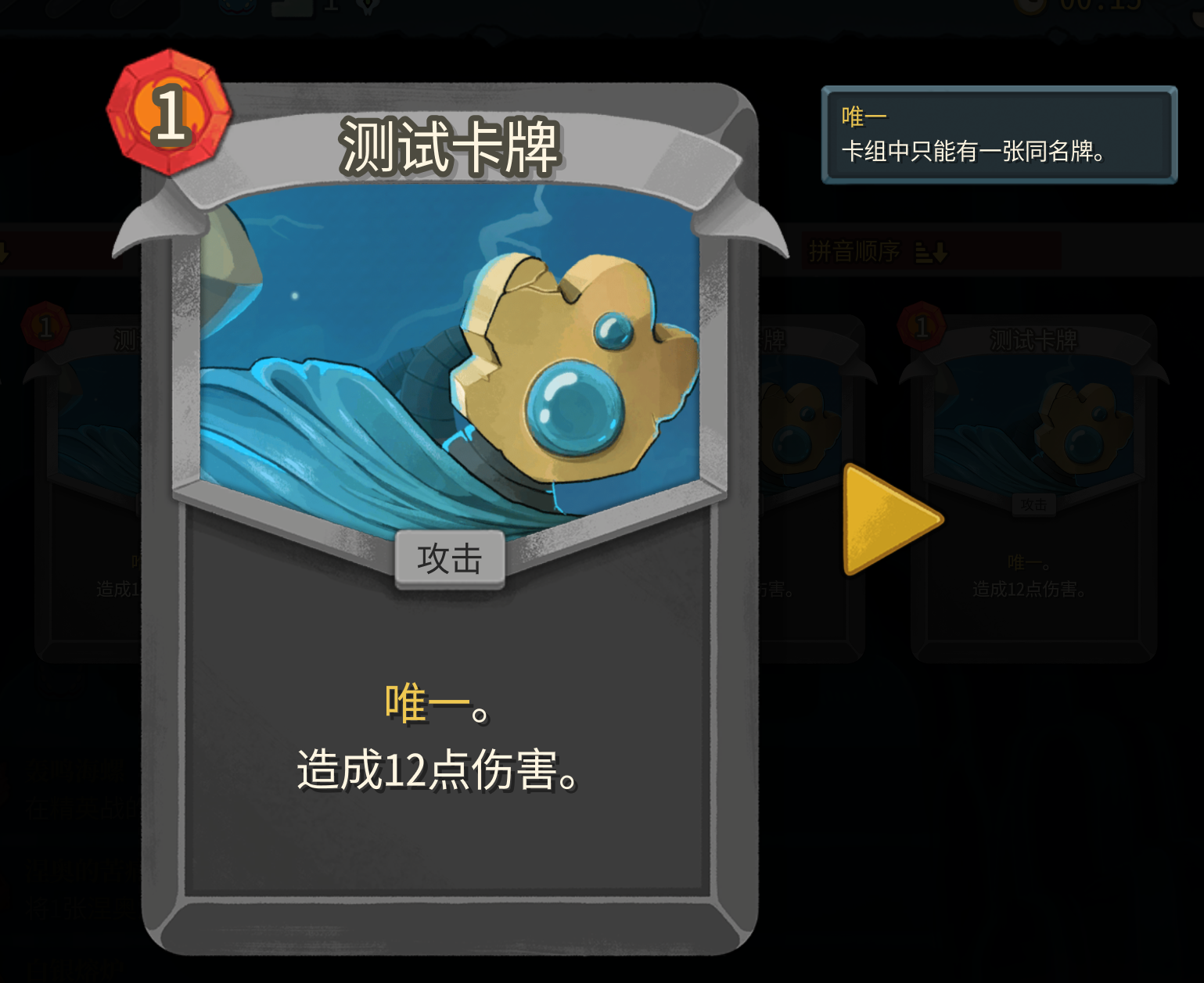
添加新卡牌关键词 这里的关键词指的是消耗,虚无一类的卡牌属性,塔2并不需要你在卡牌描述里写这些,只需在CanonicalKeywords添加即可。
1
2
3
4
5
6
7
8
public class MyKeywords CustomEnum("UNIQUE" ) ]KeywordProperties(AutoKeywordPosition.Before) ]public static CardKeyword Unique;
添加一个本地化文件,{modId}/localization/{Language}/card_keywords.json。
1
2
3
4
{ "TEST-UNIQUE.description" : "卡组中只能有一张同名牌。" , "TEST-UNIQUE.title" : "唯一" }
然后在你的卡牌类里添加这一行,或者添加keyword:
1 public override IEnumerable<CardKeyword> CanonicalKeywords => [MyKeywords.Unique];
添加局内保存 在卡牌、遗物、附魔、Modifier(每日挑战效果)的Model的属性中中添加带SavedProperty的属性即可保存。
1 2 3 4 5 6 7 8 9 10 11 12 13 14 15 16 17 18 [Pool(typeof(SharedRelicPool)) ]public class TestRelic : CustomRelicModel SavedProperty ]public int Test_GameTurns { get ; set ; } = 0 ;protected override IEnumerable<DynamicVar> CanonicalVars => [new CardsVar(1 ), new DynamicVar("GameTurns" , Test_GameTurns)];public override async Task AfterPlayerTurnStart (PlayerChoiceContext choiceContext, Player player )"GameTurns" ].BaseValue = Test_GameTurns;await CardPileCmd.Draw(choiceContext, DynamicVars.Cards.IntValue, player);
1
2
3
4
5
{ "TEST-TEST_RELIC.title" : "测试遗物" , "TEST-TEST_RELIC.description" : "每回合开始时,抽[blue]{Cards}[/blue]张牌。\n已经历过[blue]{GameTurns}[/blue]回合了。" , "TEST-TEST_RELIC.flavor" : "觉得很眼熟?" }
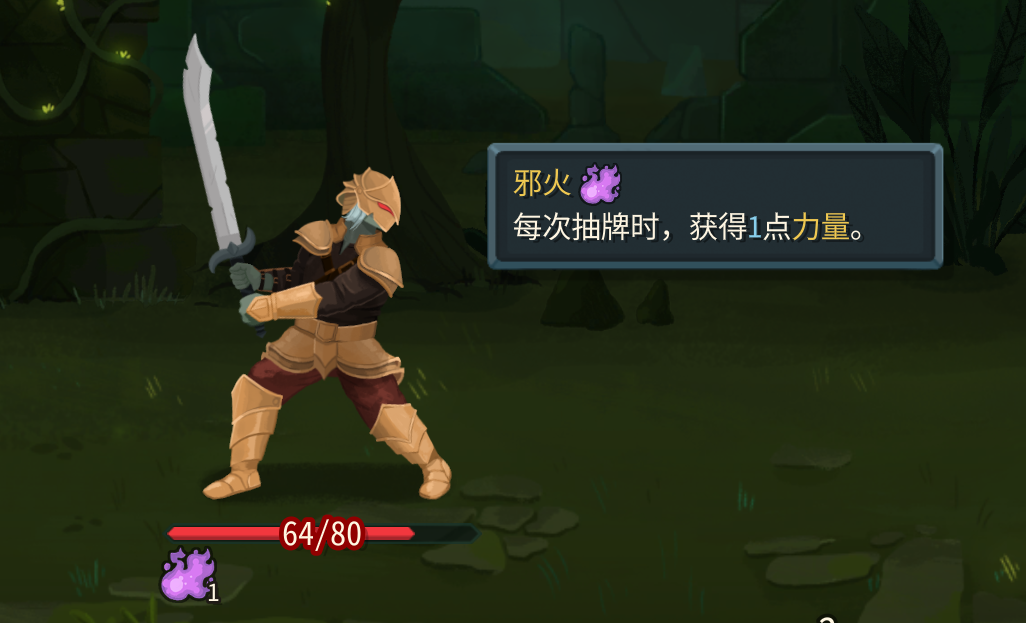
添加新能力 新建类:
1
2
3
4
5
6
7
8
9
10
11
12
13
14
15
16
17
public class TestPower : CustomPowerModel public override PowerType Type => PowerType.Buff;public override PowerStackType StackType => PowerStackType.Counter;public override string ? CustomPackedIconPath => "res://test/powers/test_power.png" ;public override string ? CustomBigIconPath => "res://test/powers/test_power.png" ;public override async Task AfterCardDrawn (PlayerChoiceContext choiceContext, CardModel card, bool fromHandDraw )await PowerCmd.Apply<StrengthPower>(Owner, Amount, Owner, null );
添加json,{modId}/localization/{Language}/powers.json。
1
2
3
4
5
{ "TEST-TEST_POWER.description" : "每次抽牌时,获得一点[gold]力量[/gold]。" , "TEST-TEST_POWER.smartDescription" : "每次抽牌时,获得[blue]{Amount}[/blue]点[gold]力量[/gold]。" , "TEST-TEST_POWER.title" : "邪火" }
然后使用PowerCmd.Apply<TestPower>(...)给予即可。
添加新怪物 TODO
添加新事件 TODO
添加新药水 TODO
添加新附魔 TODO
添加先古卡 TODO
添加先古之民 TODO